


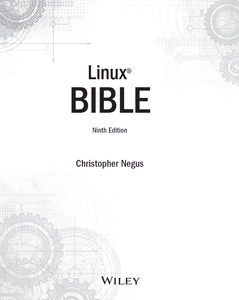

Linux Bible, 9th edition
| Format | e-Book |
| Language | English |
| This Edition Published | 2015 |
| Author | Christopher Negus |
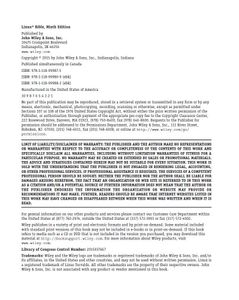
| Publisher | John Wiley & Sons, Inc. |
| Project Editor/Coordinator/Director | Martin V. Minner, Brent Savage |
| Technical Editor | Richard Blum |
| Production Director/Manager | Kathleen Wisor |
| Copy Editor | Gwenette Gaddis |
| Contributor | Mary Beth Wakefield, Barry Pruett |
| Marketing/Advertising | David Mayhew |
| Marketing Manager | Carrie Sherrill |
| Business Affairs | Amy Knies |
| Associate Publisher | Jim Minatel |
| Proofreader | Amy Schneider |
| Indexer | John Sleeva |
| About/Subject | Linux |
| Format | e-Book |
| Language | English |
| Location | Indianapolis, Indiana |
| This Edition Published | 2015 |
| Pages / Font | 859 pages |
| Edition No. | 9 |
| ISBN | 978-1-118-99987-5 |
| ISBN | 978-1-118-99989-9 (ebk) |
| ISBN | 978-1-118-99988-2 (ebk) |
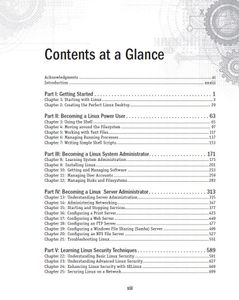
| Chapters | Acknowledgments
Introduction
Part I: Getting Started
Chapter 1: Starting with Linux
Chapter 2: Creating the Perfect Linux Desktop
Part II: Becoming a Linux Power User
Chapter 3: Using the Shell
Chapter 4: Moving around the Filesystem
Chapter 5: Working with Text Files
Chapter 6: Managing Running Processes
Chapter 7: Writing Simple Shell Scripts
Part III: Becoming a Linux System Administrator
Chapter 8: Learning System Administration
Chapter 9: Installing Linux
Chapter 10: Getting and Managing Software
Chapter 11: Managing User Accounts
Chapter 12: Managing Disks and Filesystems
Part IV: Becoming a Linux Server Administrator
Chapter 13: Understanding Server Administration
Chapter 14: Administering Networking
Chapter 15: Starting and Stopping Services
Chapter 16: Configuring a Print Server
Chapter 17: Configuring a Web Server
Chapter 18: Configuring an FTP Server
Chapter 19: Configuring a Windows File Sharing (Samba) Server
Chapter 20: Configuring an NFS File Server
Chapter 21: Troubleshooting Linux
Part V: Learning Linux Security Techniques
Chapter 22: Understanding Basic Linux Security
Chapter 23: Understanding Advanced Linux Security
Chapter 24: Enhancing Linux Security with SELinux
Chapter 25: Securing Linux on a Network
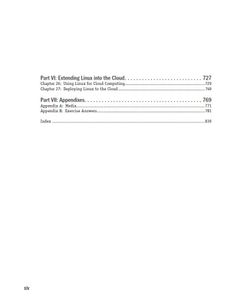
Part VI: Extending Linux into the Cloud
Chapter 26: Using Linux for Cloud Computing
Chapter 27: Deploying Linux to the Cloud
Part VII: Appendixes
Appendix A: Media
Appendix B: Exercise Answers
Index Acknowledgments
Introduction
Part I: Getting Started
Chapter 1: Starting with Linux
Chapter 2: Creating the Perfect Linux Desktop
Part II: Becoming a Linux Power User
Chapter 3: Using the Shell
Chapter 4: Moving around the Filesystem
Chapter 5: Working with Text Files
Chapter 6: Managing Running Processes
Chapter 7: Writing Simple Shell Scripts
Part III: Becoming a Linux System Administrator
Chapter 8: Learning System Administration
Chapter 9: Installing Linux
Chapter 10: Getting and Managing Software
Chapter 11: Managing User Accounts
Chapter 12: Managing Disks and Filesystems
Part IV: Becoming a Linux Server Administrator
Chapter 13: Understanding Server Administration
Chapter 14: Administering Networking
Chapter 15: Starting and Stopping Services
Chapter 16: Configuring a Print Server
Chapter 17: Configuring a Web Server
Chapter 18: Configuring an FTP Server
Chapter 19: Configuring a Windows File Sharing (Samba) Server
Chapter 20: Configuring an NFS File Server
Chapter 21: Troubleshooting Linux
Part V: Learning Linux Security Techniques
Chapter 22: Understanding Basic Linux Security
Chapter 23: Understanding Advanced Linux Security
Chapter 24: Enhancing Linux Security with SELinux
Chapter 25: Securing Linux on a Network
Part VI: Extending Linux into the Cloud
Chapter 26: Using Linux for Cloud Computing
Chapter 27: Deploying Linux to the Cloud
Part VII: Appendixes
Appendix A: Media
Appendix B: Exercise Answers
Index Show all ▾ |
Added by phasics