

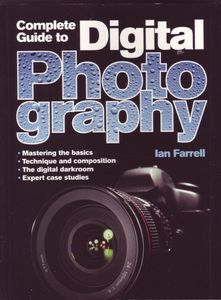
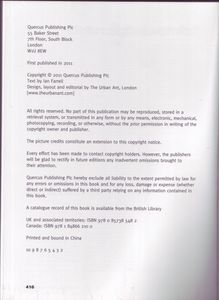
| Publisher | Quercus Publishing Plc |
| Copyright Holder | Quercus Publishing Plc |
| Designed by | The Urban Ant |
| Layout by/Layout Coordinator | The Urban Ant |
| Editorial Coordination | The Urban Ant |
| Format | Paperback |
| Language | English |
| Copyright | 2011 |
| Pages / Font | 416 pages |
| Barcode | 9 780857 385482 |
| ISBN | 978 0 85738 548 2 |
| ISBN | 978 1 84866 210 0 |
| Printer's Key | 10 9 8 7 6 5 4 3 2 |
| Price | £15.00 |
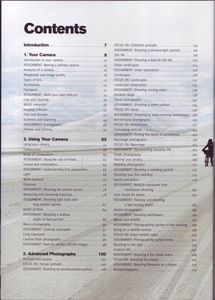
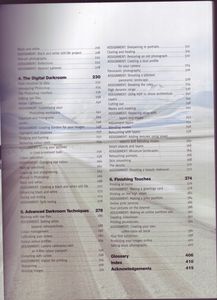
| Chapters | Introduction
1. Your Camera
Introduction to your camera
ASSIGNMENT: Making a pinhole Camera
Anatomy of a camera
Megapixels and image quality
Types of lens
Accessories
Flashguns
ASSIGNMENT: Make your own reflector
Care and cleaning
Which computer?
Imaging software
Files and formats
Scanners and scanning
Printers and printing
2. Using Your Camera
Using your camera
Composition
Rules of composition
ASSIGNMENT: Using the rule of thirds
Lenses and composition
ASSIGNMENT: Understanding lens perspective
Light
White balance
Exposure
ASSIGNMENT: Shooting the perfect sunset
Measuring and assessing exposure
ASSIGNMENT: Shooting light trails with long shutter speeds
Depth of field
ASSIGNMENT: Shooting a shallow depth of field portrait
Macro photography
ASSIGNMENT: Close-up eyescapes
Creative flash photography
ASSIGNMENT: Flash-lit, smokey, still life images
3. Advanced Photography
Portraits and people
FOCUS ON: Formal portraits
ASSIGNMENT: Shooting an environment portrait
FOCUS ON: Children's portraits
ASSIGNMENT: Shooting a window-light portrait
Still life
ASSIGNMENT: Shooting a back-lit still life
Urban landscapes
ASSIGNMENT: Urban exploration
Landscapes
FOCUS ON: :Landscapes
Landscape compostion
ASSIGNMENT: Shooting moving water
Dynamic range
Travel photography
ASSIGNMENT: Shooting a street portrait
FOCUS ON: Travel
ASSIGNMENT: Shooting an early morning marketplace
Architectural photography
FOCUS ON: Architecture
Converging verticals
ASSIGNMENT: Finding the details in architecture
Reportage photography
ASSIGNMENT: Documenting everyday life
Street photography
Sharing your photos
Wedding photography
ASSIGNMENT: Shooting a wedding portrait
Shooting your first wedding
Sports and action
ASSIGNMENT: Multiple exposures from continuous shooting
Lens choice for sport
ASSIGNMENT: Tracking and shooting a fast moving object
Garden photography
ASSIGNMENT: Shooting wildflowers
Nature and wildlife
ASSIGNMENT: Photographing spiders in the morning
Going on a wildlife holiday
FOCUS ON: Urban wildlife safari
ASSIGNMENT: Photographing garden birds
Shooting in low light
Creative ISO
ASSIGNMENT: Shooting a live music event
FOCUS ON: Shooting live events
ASSIGNMENTS: Shooting fireworks on a tripod
Astrophotography
Black and white
ASSIGNMENT: Black and white still-life project
Fine-art photography
ASSIGNMENT: Reflections
ASSIGNMENT: Abstract patterns
4. The Digital Darkroom
From emulsion to data
Introducing Photoshop
The Photoshop interface
Editing raw files
Adobe Lightroom
ASSIGNMENT: Customising your Photoshop workspace
Exposure and histograms
Levels
ASSIGNMENT: Creating borders for your images
Highlights and shadows
Dodging and burning
Removing colour casts
ASSIGNMENT: Giving your pictures a cross-processed look
Colour saturation
ASSIGNMENT: Changing eye colour
Making selections
Cropping and straightening
History in Photoshop
Black and white
ASSIGNMENT: Creating a black and white still life
Enhancing black and white
Toning and tinting
ASSIGNMENT: Split toning
5. Advanced Darkroom Techniques
Working with raw files
ASSIGNMENT: Setting white balance retrospectively
Colour management
Calibrating your screen
Output colour profiles
ASSIGNMENT: Camera calibration with an X-Rite colour passport
Correcting with curves
ASSIGNMENT: Digital lith printing
Sharpening
Resizing images
ASSIGNMENT: Sharpening with portraits
Cloning and healing
ASSIGNMENT: Restoring and old photograph
ASSIGNMENT: Creating a dust profile for your camera
Panoramic photography
ASSIGNMENT: Shooting a stitched panoramic landscape
ASSIGNMENT: Breaking the rules
High dynamic range
ASSIGNMENT: Using HDR to shoot architecture
Layers
Cutting out
Masks and masking
ASSIGNMENT: Replacing skies with layers and masks
Adjustment layers
Blending modes
Retouching with layers
ASSIGNMENT: Adding textures using smart objects and blending modes
Smart objects and layers
ASSIGNMENT: Miniature landscapes
Retouching portraits
Skin smoothing
The details
ASSIGNMENT: Shooting a beauty makeover
6. Finishing Touches
Printing at home
ASSIGNMENT: Making a greetings card
Printing on the high street
ASSIGNMENT: Making a print portfolio
Online print service
Your pictures on the internet
ASSIGNMENT: Making an online portfolio site
Creating slideshows
Printing photbooks
ASSIGNMENT: Creating your own coffee table art book
Your first exhibition
Protecting your images online
Selling stock photography
Glossary
Index
Acknowledgements Introduction
1. Your Camera
Introduction to your camera
ASSIGNMENT: Making a pinhole Camera
Anatomy of a camera
Megapixels and image quality
Types of lens
Accessories
Flashguns
ASSIGNMENT: Make your own reflector
Care and cleaning
Which computer?
Imaging software
Files and formats
Scanners and scanning
Printers and printing
2. Using Your Camera
Using your camera
Composition
Rules of composition
ASSIGNMENT: Using the rule of thirds
Lenses and composition
ASSIGNMENT: Understanding lens perspective
Light
White balance
Exposure
ASSIGNMENT: Shooting the perfect sunset
Measuring and assessing exposure
ASSIGNMENT: Shooting light trails with long shutter speeds
Depth of field
ASSIGNMENT: Shooting a shallow depth of field portrait
Macro photography
ASSIGNMENT: Close-up eyescapes
Creative flash photography
ASSIGNMENT: Flash-lit, smokey, still life images
3. Advanced Photography
Portraits and people
FOCUS ON: Formal portraits
ASSIGNMENT: Shooting an environment portrait
FOCUS ON: Children's portraits
ASSIGNMENT: Shooting a window-light portrait
Still life
ASSIGNMENT: Shooting a back-lit still life
Urban landscapes
ASSIGNMENT: Urban exploration
Landscapes
FOCUS ON: :Landscapes
Landscape compostion
ASSIGNMENT: Shooting moving water
Dynamic range
Travel photography
ASSIGNMENT: Shooting a street portrait
FOCUS ON: Travel
ASSIGNMENT: Shooting an early morning marketplace
Architectural photography
FOCUS ON: Architecture
Converging verticals
ASSIGNMENT: Finding the details in architecture
Reportage photography
ASSIGNMENT: Documenting everyday life
Street photography
Sharing your photos
Wedding photography
ASSIGNMENT: Shooting a wedding portrait
Shooting your first wedding
Sports and action
ASSIGNMENT: Multiple exposures from continuous shooting
Lens choice for sport
ASSIGNMENT: Tracking and shooting a fast moving object
Garden photography
ASSIGNMENT: Shooting wildflowers
Nature and wildlife
ASSIGNMENT: Photographing spiders in the morning
Going on a wildlife holiday
FOCUS ON: Urban wildlife safari
ASSIGNMENT: Photographing garden birds
Shooting in low light
Creative ISO
ASSIGNMENT: Shooting a live music event
FOCUS ON: Shooting live events
ASSIGNMENTS: Shooting fireworks on a tripod
Astrophotography
Black and white
ASSIGNMENT: Black and white still-life project
Fine-art photography
ASSIGNMENT: Reflections
ASSIGNMENT: Abstract patterns
4. The Digital Darkroom
From emulsion to data
Introducing Photoshop
The Photoshop interface
Editing raw files
Adobe Lightroom
ASSIGNMENT: Customising your Photoshop workspace
Exposure and histograms
Levels
ASSIGNMENT: Creating borders for your images
Highlights and shadows
Dodging and burning
Removing colour casts
ASSIGNMENT: Giving your pictures a cross-processed look
Colour saturation
ASSIGNMENT: Changing eye colour
Making selections
Cropping and straightening
History in Photoshop
Black and white
ASSIGNMENT: Creating a black and white still life
Enhancing black and white
Toning and tinting
ASSIGNMENT: Split toning
5. Advanced Darkroom Techniques
Working with raw files
ASSIGNMENT: Setting white balance retrospectively
Colour management
Calibrating your screen
Output colour profiles
ASSIGNMENT: Camera calibration with an X-Rite colour passport
Correcting with curves
ASSIGNMENT: Digital lith printing
Sharpening
Resizing images
ASSIGNMENT: Sharpening with portraits
Cloning and healing
ASSIGNMENT: Restoring and old photograph
ASSIGNMENT: Creating a dust profile for your camera
Panoramic photography
ASSIGNMENT: Shooting a stitched panoramic landscape
ASSIGNMENT: Breaking the rules
High dynamic range
ASSIGNMENT: Using HDR to shoot architecture
Layers
Cutting out
Masks and masking
ASSIGNMENT: Replacing skies with layers and masks
Adjustment layers
Blending modes
Retouching with layers
ASSIGNMENT: Adding textures using smart objects and blending modes
Smart objects and layers
ASSIGNMENT: Miniature landscapes
Retouching portraits
Skin smoothing
The details
ASSIGNMENT: Shooting a beauty makeover
6. Finishing Touches
Printing at home
ASSIGNMENT: Making a greetings card
Printing on the high street
ASSIGNMENT: Making a print portfolio
Online print service
Your pictures on the internet
ASSIGNMENT: Making an online portfolio site
Creating slideshows
Printing photbooks
ASSIGNMENT: Creating your own coffee table art book
Your first exhibition
Protecting your images online
Selling stock photography
Glossary
Index
Acknowledgements Show all ▾ |