

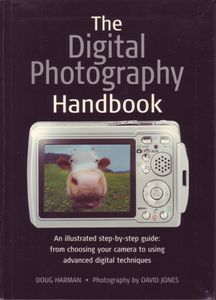
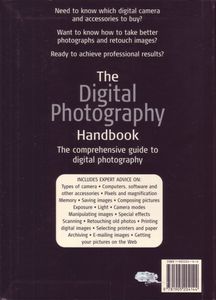

The Digital Photography Handbook
| Format | Soft cover |
| Language | English |
| Copyright | 2005 |
| Author | Doug Harman |
| Photography | David Jones (6) |
| Publisher | Smith-Davies Publishing Ltd |
| Copyright Holder | Smith-Davies Publishing Ltd |
| Format | Soft cover |
| Language | English |
| Copyright | 2005 |
| Pages / Font | 221 pages |
| ISBN | 1-905204-14-0 |
| Barcode | 9 781905 204144 |
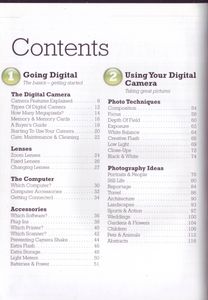
| Chapters | 1 Going Digital
The basics – getting started
The Digital Camera
Camera Features Explained
Types of Digital Camera
How Many Megapixels?
Memory & Memory Cards
A Buyer’s Guide
Starting To Use Your Camera
Care, Maintenance & Cleaning
Lenses
Zoom Lenses
Fixed Lenses
Changing Lenses
The Computer
Which Computer?
Computer Accessories
Getting Connected
Accessories
Which Software?
Plug-Ins
Which Printer?
Which Scanner?
Preventing Camera Shake
Extra Flash
Extra Storage
Light Meters
Batteries & Power
2 Using Your Digital Camera
Taking great pictures
Photo Techniques
Composition
Focus
Depth of Field
Exposure
White Balance
Creative Flash
Low Light
Close-Ups
Black & White
Photography Idea
Portraits & People
Still Life
Reportage
Travel
Architecture
Landscapes
Sports & Action
Weddings
Gardens & Flowers
Children
Pets & Animals
Abstracts
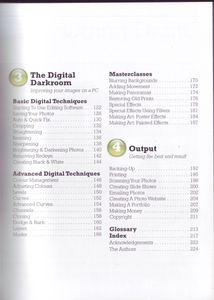
3 The Digital Darkroom
Improving your images on a pC
Basic Digital Techniques
Starting To Use Editing Software
Saving Your Photos
Auto & Quick Fix
Cropping
Straightening
Resizing
Sharpening
Brightening & Darkening Photos
Removing Redeye
Creating Black & White
Advancing Digital Techniques
Colour Management
Adjusting Colours
Levels
Curves
Advanced Curves
Channels
Cloning
Dodge & Burn
Layers
Masks
Masterclasses
Blurring Backgrounds
Adding Movement
Making Panoramas
Restoring Old Prints
Special Effects
Special Effects Using Filters
Making Art: Poster Effects
Making Art: Painted Effects
4 Output
Getting the best end result
Backing-Up
Printing
Scanning Your Photos
Creating Slide Shows
Emailing Photos
Creating A Photo Website
Making a Portfolio
Making Money
Copyright
Glossary
Index
Acknowledgements
The Authors 1 Going Digital
The basics – getting started
The Digital Camera
Camera Features Explained
Types of Digital Camera
How Many Megapixels?
Memory & Memory Cards
A Buyer’s Guide
Starting To Use Your Camera
Care, Maintenance & Cleaning
Lenses
Zoom Lenses
Fixed Lenses
Changing Lenses
The Computer
Which Computer?
Computer Accessories
Getting Connected
Accessories
Which Software?
Plug-Ins
Which Printer?
Which Scanner?
Preventing Camera Shake
Extra Flash
Extra Storage
Light Meters
Batteries & Power
2 Using Your Digital Camera
Taking great pictures
Photo Techniques
Composition
Focus
Depth of Field
Exposure
White Balance
Creative Flash
Low Light
Close-Ups
Black & White
Photography Idea
Portraits & People
Still Life
Reportage
Travel
Architecture
Landscapes
Sports & Action
Weddings
Gardens & Flowers
Children
Pets & Animals
Abstracts
3 The Digital Darkroom
Improving your images on a pC
Basic Digital Techniques
Starting To Use Editing Software
Saving Your Photos
Auto & Quick Fix
Cropping
Straightening
Resizing
Sharpening
Brightening & Darkening Photos
Removing Redeye
Creating Black & White
Advancing Digital Techniques
Colour Management
Adjusting Colours
Levels
Curves
Advanced Curves
Channels
Cloning
Dodge & Burn
Layers
Masks
Masterclasses
Blurring Backgrounds
Adding Movement
Making Panoramas
Restoring Old Prints
Special Effects
Special Effects Using Filters
Making Art: Poster Effects
Making Art: Painted Effects
4 Output
Getting the best end result
Backing-Up
Printing
Scanning Your Photos
Creating Slide Shows
Emailing Photos
Creating A Photo Website
Making a Portfolio
Making Money
Copyright
Glossary
Index
Acknowledgements
The Authors Show all ▾ |
Added by Vhazza