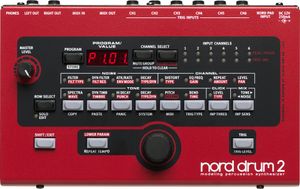
| Notes | The Nord Drum 2 is a one of a kind drum synthesizer for drummers, percussionists and producers seeking unique and playable percussive sounds.
With an extremely lively dynamic response, flexible connectivity and a broad sound palette ranging from classic synthetic drums to life-like tuned percussion and acoustic drums, the Nord Drum 2 is both an inspiring instrument and an infinite source of sounds.
The Sound generation takes place in the three sections Tone, Noise and Click.
The sounds of the Nord Drum 2 are all synthesized in real-time - allowing you to both sculpt and play sounds with a unique dynamic response, regardless if you prefer to play with drum sticks or from a sequencer.
The Tone Section is specialized for creating tonal and harmonically complex sound spectras and has three synthesis modes – Resonant synthesis, Subtractive Synthesis and Frequency Modulation synthesis.
The Resonant synthesis mode offers a wide range of complex spectras inspired by materials like drum heads, marimba, vibraphone, tines and cymbals. A unique feature includes the possibility to tune harmonic spectra.
The Subtractive mode sports the classic basic Sine, Saw, Square and Pulse waveforms and is brilliant for creating classic synth-type drum sounds and effects.
The FM Synthesis mode features 6 different FM algorithms where Timbre controls modulation amount and Spectra controls modulation frequency.
The Noise section is all about producing noise and is very powerful. Create anything from silky smooth hiss to grainy gravel to give the Tone part of the sound some texture, strange attack or even an impression of reverb.
The Noise can be sculpted with Low-Pass, High-Pass or Band-Pass filters with Cut-Off and Resonance controls. Once you found the noise of your choice, it can be adjusted to respond dynamically to velocity in the same manner as with the Tone section.
A great new feature in the Nord Drum 2 Noise Section is the Attack controls. In its standard mode it can add an attack envelope to the Noise, brilliant for shaker-like sounds or perhaps a reversed reverb type of effect. The Attack Rate/LFO mode creates a pulsing attack effect with adjustable rate for creating strange, rattling percussive sounds. Several dedicated attack types for Hand Claps are also available!
The Decay control is just as powerful, with a choice of Linear and Logarithmic and Gated decay types. The Dynamic control is the icing on the cake, enabling you to control the length of the decay with velocity. Combine this with the equally powerful dynamic controls of the Tone Section and it won’t take long before realizing the potential for creating complex sounds with fascinating material-like behaviors!
The Click-section is a specialized section for an ultra-short attack to the sound. A wide range of different click type are available as well as a level control for finding the sweet spot where the Click merges with the other elements and becomes one coherent sound.
Each of the 6 channels of the Nord Drum 2 has its own powerful effects – Distortion, EQ and Repeat.
The Distortion effect has two modes – a crunchy Overdrive effect and a crackling sample-rate reducing Crush effect. Sometimes, adding just a touch of overdrive to all of your sounds can make a huge difference in terms of realism. Naturally, you can put the pedal to the metal and distort the sounds beyond recognition – they will still be very playable.
A great sounding parametric Equalizer with selectable band and amount is also available for each channel, brilliant for adding some finish or attitude to your sounds.
The Repeat effect produces an effect similar to a MIDI Delay. The repeating hits will be generated as if they were played from a pad, including the complex dynamic behavior of the Nord Drum 2 sound engine. The Repeat Tempo is set globally for all channels, but number of repeats and the effect amount can be set for each channel separately. |